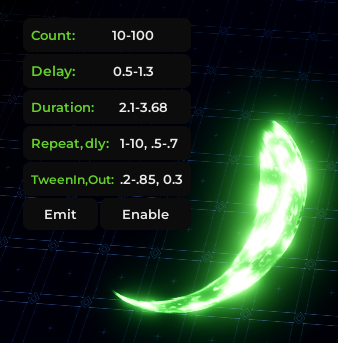
# Attributes

<table><thead><tr><th width="139">Name</th><th>Definition</th></tr></thead><tbody><tr><td>Effect</td><td><code>Beam, Trail, Particle, Lights, ..</code></td></tr><tr><td>VFXContainer</td><td><code>BasePart, Folder, Attachment, ..</code></td></tr></tbody></table>

Global attributes (used on all types):

<table><thead><tr><th width="151">Attribute</th><th width="178">Type</th><th>Description</th></tr></thead><tbody><tr><td><code>EmitDelay</code></td><td><code>number|NumberRange</code></td><td>The delay which after, the vfx emits (plays)</td></tr><tr><td><code>EmitDuration</code></td><td><code>number|NumberRange</code></td><td>When emitted, the vfx gets enabled for this duration</td></tr><tr><td><code>ResetOnFinish</code></td><td><code>boolean</code></td><td>Tells add-ons &#x26; module to reset VFX when finished</td></tr><tr><td><code>Clone</code></td><td><code>boolean</code></td><td>Will clone the vfx and emit/enable the clone instead</td></tr><tr><td><code>EmitRepeat</code></td><td><code>number|NumberRange</code></td><td>Number of repeats when VFX is emitted (<code>-1</code> = inf)</td></tr><tr><td><code>EmitRepeatDelay</code></td><td><code>number|NumberRange</code></td><td>The delay between repeats (can be random)</td></tr></tbody></table>

Tween attributes (only on effects)

<table><thead><tr><th width="153">Attribute</th><th width="182">Type</th><th>Description</th></tr></thead><tbody><tr><td><code>TweenIn</code></td><td><code>number|NumberRange</code></td><td>TweenIn time when an Effect is <code>enabled</code></td></tr><tr><td><code>TweenOut</code></td><td><code>number|NumberRange</code></td><td>TweenIn time when an Effect is <code>disabled</code></td></tr><tr><td><code>TweenProperties</code></td><td><code>string?</code></td><td>The properties to tween seperated by a <code>,</code></td></tr></tbody></table>

Tween attributes cause an Effect to be `.enable()`d when emitted just like `EmitDuration`

## How to use

Attributes are normally applied to Effects, but they can also be applied to VFXContainers-\
by disabling the setting `Set descendants' attributes` or pressing `Y` to easily switch modes\
![](https://3676259257-files.gitbook.io/~/files/v0/b/gitbook-x-prod.appspot.com/o/spaces%2FVUU2n77rqU9V23f4W1Tt%2Fuploads%2FkhjgNIWPorkWvv4edMdo%2Fimage.png?alt=media\&token=d9fc1c91-8d0a-4b82-912f-3005e33323f7)

## Color Attribute

Attributes named `Color` on any VFX instance will be recolored automatically by `.recolor` and sliders\
This will be useful in cases like making an emittable script with a Color attribute like this Vignette

{% embed url="<https://cdn.discordapp.com/attachments/1454585621376012288/1454585622416068693/Vignette.mp4?ex=69563d2d&hm=ee66c01ebf86a66ac3c0ae1eda34e812576bee62dc557c733805f2a68a08fd02&is=6954ebad>" %}

{% hint style="success" %}
This vignette script is open-source and can be found in the [discord server](https://discord.gg/Ud4ud95KNd)
{% endhint %}

## Loops

Loops happen when `EmitRepeat` is `-1` which will make the VFX repeat until `.disable()`'d\
As you can see in the vignette video above, the script has `-1` repeat and is enabled,\
Thats why it keeps emitting (executing) the script every `EmitRepeatDelay` (until disabled)

## Randomizing

Most of these attributes can be randomized by typing min-max (from min to max)\
This will turn them into a `NumberRange` which the module uses to randomize attributes

<div align="left"><figure><img src="https://vfxer.pages.dev/NumberRange.png" alt=""><figcaption></figcaption></figure></div>

## Custom Attributes

You can make and use custom attributes in 2 ways

{% stepper %}
{% step %}

### Add-ons

Add-ons can make their own attributes and make a UI for it using the UI-Library\
![](https://3676259257-files.gitbook.io/~/files/v0/b/gitbook-x-prod.appspot.com/o/spaces%2FVUU2n77rqU9V23f4W1Tt%2Fuploads%2Far9AeKiTA4XewyIqMNuF%2Fimage.png?alt=media\&token=8c0be15b-d0e9-4855-af45-bc075311bd7c)\
\- Learn more at [Create Add-ons](https://vfxer.gitbook.io/plugin/create-addons)
{% endstep %}

{% step %}

### Emittable scripts

Emittable scripts can use attributes with `script:GetAttributes()` or using the cached table

{% code title="EmittableScriptExample" lineNumbers="true" %}

```luau
local Service = game:GetService("WhateverService") -- dependencies

return function(attributes, isRepeating)
     Vignette.ImageColor = attributes.Color
end -- returning a function is required if the script emits more than once
```

{% endcode %}
{% endstep %}
{% endstepper %}
